

Migrating My Entire Server Infrastructure with Claude Code: A Late Night Story
It was early evening when I decided to finally tackle something I had been putting off for months. Migrating all my services from a DigitalOcean droplet to a cheaper RackNerd VPS.
The DigitalOcean bill was around $15/month. RackNerd offered similar specs for about $55/year. The math was simple. The migration? Not so much.
RackNerd would not be my choice for commercial production workloads. It lacks the managed backup and snapshot features that DigitalOcean provides. My guess is they achieve those price points through refurbished hardware or by overprovisioning physical CPUs across more virtual servers than premium providers would. I have not validated this, but the economics suggest some trade-off exists. For personal projects, though, the specs are more than adequate. I could live with manual backups in exchange for the cost savings. If you are curious about RackNerd, there are good discussions on Reddit and LowEndTalkcovering people's experiences with the service.
I had four services running: my Ghost blog, a NodeBB forum for my knowledge base, Kutt.it for URL shortening, and Uptime Kuma for monitoring. Each had its own database. MySQL, MongoDB, PostgreSQL, and SQLite, respectively. Plus Redis for caching.
The thought of manually exporting databases, transferring files, fixing configs, and debugging inevitable permission issues had kept me procrastinating.
Then I remembered Claude Code.
The Setup
I have been using Claude Code for a few months now. For work at AppMaker and my personal hobby projects. Recently upgraded to the Max plan. The results had been impressive enough that I cancelled my Cursor subscription. Coding, project planning, and even updating my Notion boards via MCP. Claude Code had become my default tool.
But I had not tried it for infrastructure work. The kind of work where one wrong command could take everything down.
The confidence I had built from using it daily made me curious. Could it handle something like a full server migration?
I opened Claude Code and gave it the full context:
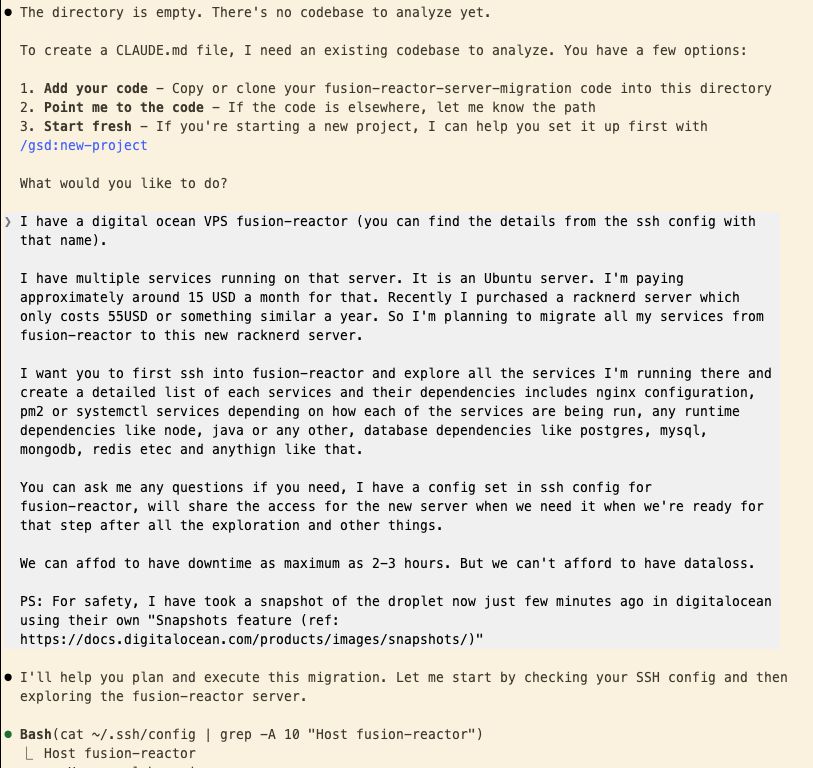
What happened next genuinely surprised me.
The Exploration
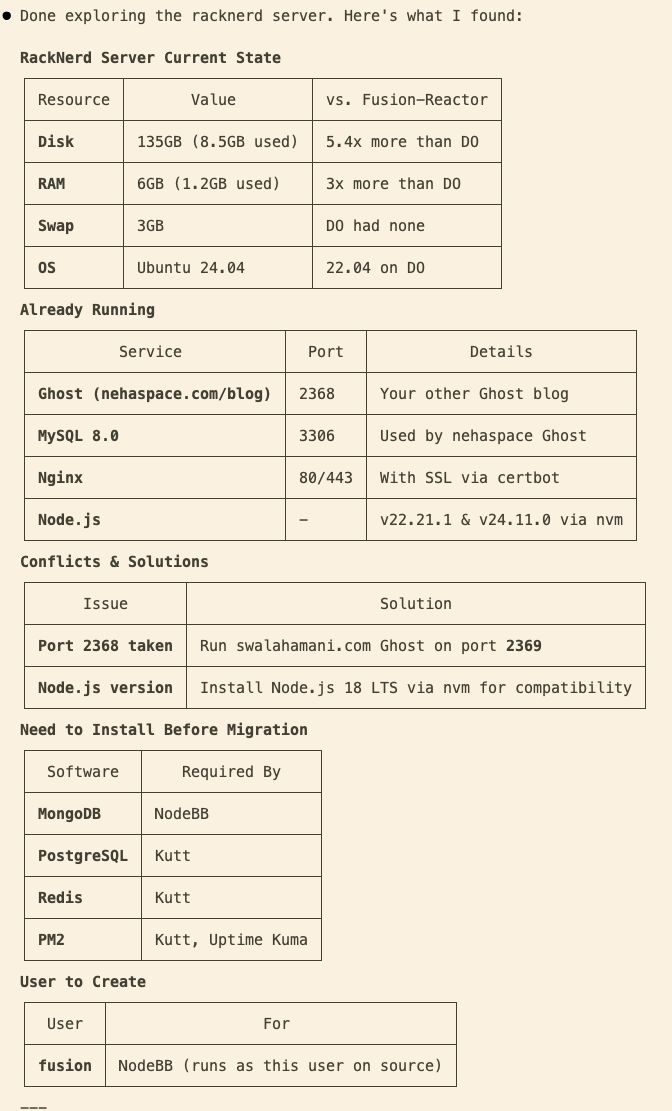
Claude started by SSH-ing into my source server. Within minutes, it had documented everything I had running. System resources, active services, runtime dependencies, and user permissions. It even identified what data was critical to back up and assessed the risk level of each component.
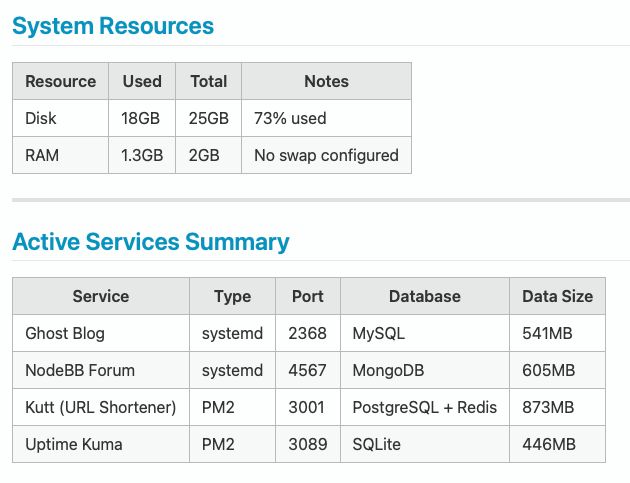
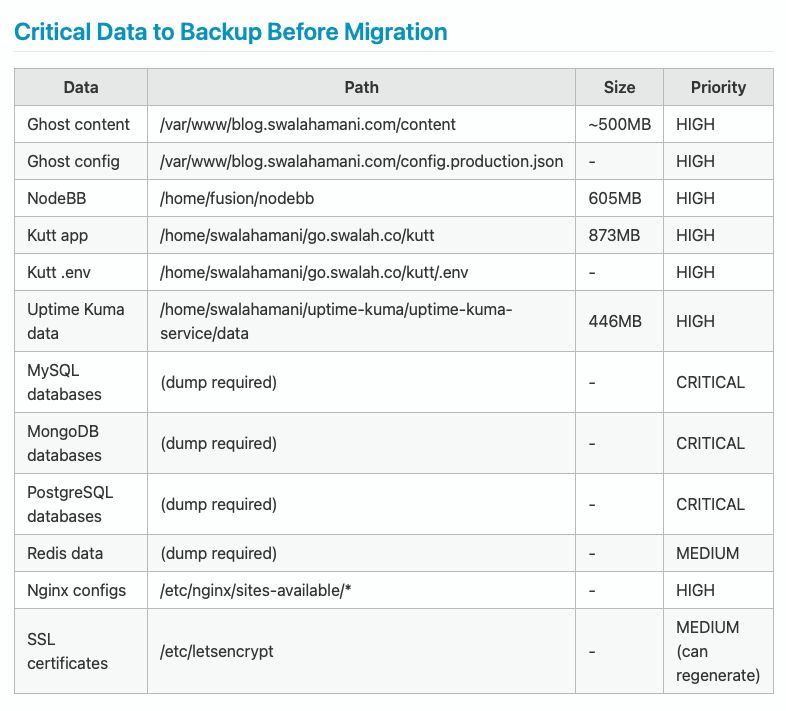
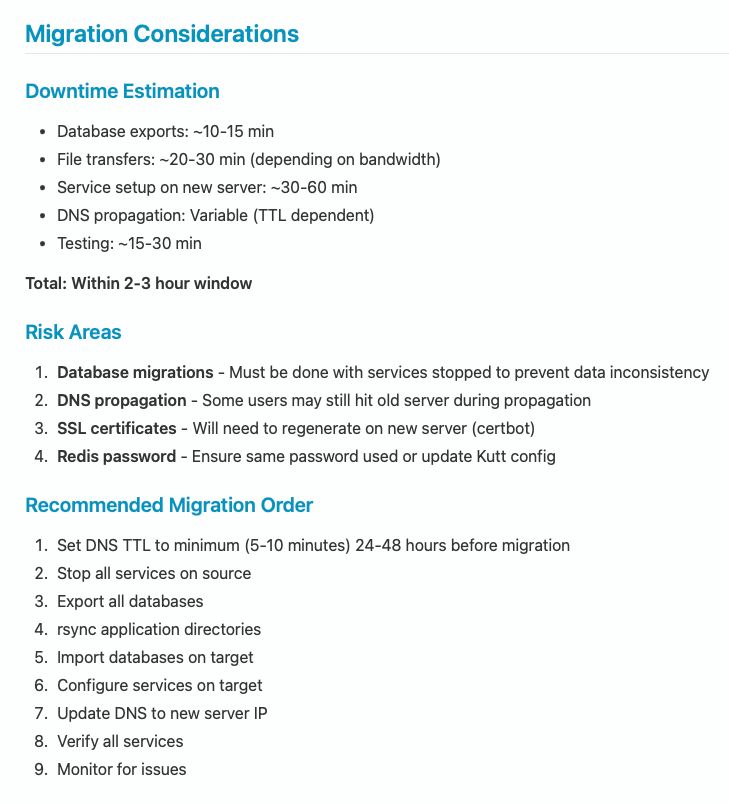
Then it analysed the migration itself. Downtime estimation, risk areas, and recommended order of operations. All laid out in clean tables before we touched anything.
Next, it explored the target server. It found my wife's Ghost blog already running on port 2368. It noted the conflicts and proposed solutions. Run the new Ghost instance on 2369 instead.
A Note on Security
Before I continue, I need to address something important.
I gave Claude Code access to my server credentials through a markdown file I asked it to create in an easy-to-fill format.
I am completely aware that handing off credentials, API keys, passwords, and other sensitive information to any LLM model that is not running offline is not advisable. Even with offline models, caution is warranted. I do not suggest anyone do this casually.
I did this as an experiment, fully aware of the risks. These are my personal hobby projects and services. They do not contain any personal data from third-party users. I could afford the risk. Your situation might be different. Please evaluate accordingly.
The Process
I had a few specific requirements:
No upgrades during migration. I proposed keeping the same Node version and other runtime dependencies as the source server. No service upgrades, no version bumps. The goal was to reduce complexity and avoid surprises. Get it working first, upgrade later if needed.
No node_modules transfer. Both servers were running different Ubuntu versions. Source was Ubuntu 22.04, target was Ubuntu 24.04. I asked Claude to exclude node_modules from the archives and run npm install fresh on the target server after extracting the code. This avoided potential binary compatibility issues.
Sequential migration. I asked Claude to migrate one service at a time rather than attempting everything in parallel. This way, if something failed, we would not overwhelm the server with simultaneous database dumps and archiving operations.
Blue-green deployment. I proposed testing each service on the target server using curl before switching DNS. This meant we could verify everything worked without affecting the live services.
No source shutdown. I decided not to stop the existing services during migration. I am the only user with write access to most of these services. The only exception was Kutt.it, which tracks analytics when people click shortened links. I figured the odds of someone clicking my links during a 2-hour window were low. Losing that bit of analytics was an acceptable trade-off.
Server sizing. I asked Claude whether we should temporarily upsize the source server to make the migration faster. It evaluated the workload and suggested it was not necessary. The existing specs would handle it fine.
The workflow became a rhythm:
- Export the database on source
- Archive the application (excluding node_modules)
- Transfer to the target
- Import database, extract files, run npm install
- Configure nginx
- Test with curl before touching DNS
- Update DNS, generate SSL certificates
- Verify everything works
Each service followed the same pattern.
When something broke (and things did break), Claude diagnosed it from logs and fixed it. MySQL connection refused because Ghost was trying IPv6 instead of IPv4? Changed localhost to 127.0.0.1. NodeBB systemd service kept exiting? Changed Type=simple to Type=forking. Uptime Kuma showing blank page? Added 'unsafe-eval' to the CSP header.
What Impressed Me
A few things stood out:
Context retention. Claude remembered the credentials, the port numbers, the directory structures across the entire session. I did not have to repeat myself.
Adaptability. When I proposed the blue-green approach and sequential migration, it adapted its workflow accordingly. It tested each service locally with curl, showed me the HTTP response codes, and only then suggested updating DNS.
Documentation instinct. At the end, when I asked if we should save anything for future maintenance, it generated a comprehensive markdown file with every path, port, command, and known issue documented. That file is now in a GitHub repo for future reference.
What I Would Do Differently
One bottleneck was file transfer. Archives went from the source server to my local machine, then from my local machine to the target server. This worked, but it was slow.
The file sizes added up. Kutt.it was onl 7MB. But Uptime Kuma was 145MB. NodeBB was 86MB. Ghost content was 170MB, plus another 56MB for the Ghost core. Waiting for these to upload over my home internet took time.
Next time, I would set up direct SSH access between the two servers before starting. That would eliminate the local machine as a pass-through and significantly speed up transfers.
The Numbers
I started early in the evening and finished past midnight. The total elapsed time was under 4 hours. But the actual working time was closer to 2-3 hours, maybe even less.
The gaps were mostly me. Taking breaks. Responding late when Claude prompted for clarifications. Missing the 1Password biometric prompts for SSH authentication and not noticing them for a few minutes. The tool was often waiting on me, not the other way around.
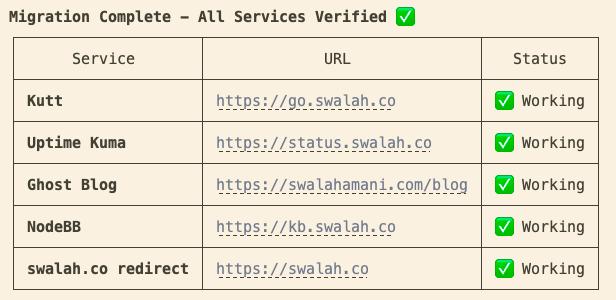
Four services, four databases, multiple domains, SSL certificates. The effective migration time was quite impressive.
The old server is now shut down and downsized to $6/month as a backup. In a few weeks, once I am confident about RackNerd's reliability, I will delete it entirely.
Monthly cost: ~$15 → ~$5
Closing Thoughts
I have written before about working with LLMs and establishing guidelines for effective collaboration. This experiment answered a question I had been curious about. Could Claude Code handle infrastructure work the same way it handles my daily development tasks?
For work that requires remembering context across dozens of commands, checking multiple servers, and adapting when things go wrong, it felt like having a senior DevOps engineer available on demand.
The server migration I had been dreading for months turned into a late-night session that was almost enjoyable. The services are running. The SSL certificates are green. Uptime Kuma is happily monitoring itself on the new server.
Sometimes the best tool is not the one that writes code for you. It is the one that handles the tedious work you have been avoiding.